<?xml version="1.0" encoding="UTF-8"?>
<?xml-stylesheet type="text/xsl" media="screen" href="/~files/atom-premium.xsl"?>
                                                                                                                                                                                                                                                                                                                                                                                                                                                                                                                                             
<feed xmlns="http://www.w3.org/2005/Atom" xmlns:feedpress="https://feed.press/xmlns" xmlns:media="http://search.yahoo.com/mrss/" xmlns:podcast="https://podcastindex.org/namespace/1.0">
  <feedpress:locale>en</feedpress:locale>
  <link rel="hub" href="https://feedpress.superfeedr.com/"/>
  <generator uri="https://jekyllrb.com/" version="4.3.3">Jekyll</generator>
  <link href="https://feedpress.me/unixtutorial" rel="self" type="application/atom+xml"/>
  <link href="https://www.unixtutorial.org/" rel="alternate" type="text/html"/>
  <updated>2025-03-15T20:36:05+00:00</updated>
  <id>https://www.unixtutorial.org/atom.xml</id>
  <title type="html">Unix Tutorial</title>
  <subtitle>Unix/Linux tutorials for beginners: how-tos and troubleshooting techniques, latest news and technical projects.</subtitle>
  <entry>
    <title type="html">macOS Sequoia 15.0</title>
    <link href="https://feedpress.me/link/15217/16791708/macos-15-sequoia" rel="alternate" type="text/html" title="macOS Sequoia 15.0"/>
    <published>2024-09-03T09:45:00+01:00</published>
    <updated>2024-09-03T09:45:00+01:00</updated>
    <id>https://www.unixtutorial.org/macos-15-sequoia</id>
    <content type="html" xml:base="https://www.unixtutorial.org/macos-15-sequoia/"><![CDATA[<p><img src="https://www.unixtutorial.org/images/software/macos-15-sequoia-developer-beta.png" alt="macOS 15 - Sequoia" />
<em>macOS 15 - Sequoia</em></p>

<p>Apple keeps shipping public betas of <a href="https://www.unixtutorial.org/software/macos/">macOS</a> <a href="https://www.apple.com/macos/macos-sequoia-preview/">Sequoia Preview</a>.</p>

<h1 id="notable-improvements-in-macos-15-sequoia">Notable improvements in macOS 15 Sequoia</h1>

<ul>
  <li><strong>Window tiling</strong> - I use a wonderful Moom app for this so far, but it seems efficient tiling is finally coming to native macOS so third party apps won’t be needed. There are menu and keyboard shortcuts to help with this.</li>
  <li><strong>Presenter preview</strong>  - catching up with this functionality in most conferencing apps, Presenter now will have a preview window that shows exactly what and how you’re presenting.</li>
  <li><strong>Photos</strong> - Collections functionality now automatically organizes your library by topics (recent, trips, people, pets) - and even lets you pin the favourite ones for quick access.</li>
  <li><strong>Background replacements</strong> - another conferencing app feature, from what I understand you can now select a background and the app will replace it with something more professional or just blur out the background.</li>
  <li><strong>Passwords app</strong> - this sounds pretty cool and almost as useable as the 1Password that I’ve been using for years. Particularly interesting is that this works across iPhones, iPads, Macs and even Windows PCs.</li>
  <li><strong>Maps now have topography and trails</strong> - don’t think this will be available globally just yet, but it’s still a nice addition. I’m doing a lot of running and wonder whether this will be useful for that.</li>
  <li><strong>Live audio transcription for Apple Notes</strong> - would be could if it starts supporting languages other than English. It should also be possible to transcribe Voice Memos.</li>
  <li><strong>AirPods Gestures</strong> - apparently it will be possible to control music and volume with gestures (nod or shake your head).</li>
</ul>

<h2 id="see-also">See Also</h2>
<ul>
  <li><a href="https://www.unixtutorial.org/software/macos/">macOS</a></li>
  <li><a href="https://www.unixtutorial.org/macos-12-monterey/">macOS 12 - Monterey</a></li>
  <li><a href="https://www.unixtutorial.org/macos-13-ventura/">macOS 13 - Ventura</a></li>
  <li><a href="https://www.unixtutorial.org/macos-14-sonoma/">macOS 14 - Sonoma</a></li>
</ul><img src="https://feedpress.me/link/15217/16791708.gif" height="1" width="1"/>]]></content>
    <author>
      <name/>
    </author>
    <category term="macos"/>
    <summary type="html"><![CDATA[macOS 15 - Sequoia]]></summary>
    <media:thumbnail xmlns:media="http://search.yahoo.com/mrss/" url="https://www.unixtutorial.org/images/software/macos-15-sequoia-developer-beta.png"/>
    <media:content xmlns:media="http://search.yahoo.com/mrss/" medium="image" url="https://www.unixtutorial.org/images/software/macos-15-sequoia-developer-beta.png"/>
  </entry>
  <entry>
    <title type="html">Video: Has This Worked Before?</title>
    <link href="https://feedpress.me/link/15217/16791133/youtube-has-this-worked-before" rel="alternate" type="text/html" title="Video: Has This Worked Before?"/>
    <published>2024-09-02T09:45:00+01:00</published>
    <updated>2024-09-02T09:45:00+01:00</updated>
    <id>https://www.unixtutorial.org/youtube-has-this-worked-before</id>
    <content type="html" xml:base="https://www.unixtutorial.org/youtube-has-this-worked-before/"><![CDATA[<p>Another video on my YouTube channel <a href="https://www.unixtutorial.tv">UnixTutorial.TV</a>: <a href="https://youtu.be/jT-yafWIEhE">Has This Worked Before?</a>. 
Please subscribe to my channel if you haven’t done so yet!</p>

<h3 id="troubleshooting-advice-has-this-worked-before"><a href="https://youtu.be/jT-yafWIEhE">Troubleshooting advice: Has This Worked Before?</a></h3>

<iframe width="560" height="315" src="https://www.youtube.com/embed/jT-yafWIEhE?si=B7IBz-xIErFTMWTA" title="YouTube video player" frameborder="0" allow="accelerometer; autoplay; clipboard-write; encrypted-media; gyroscope; picture-in-picture; web-share" referrerpolicy="strict-origin-when-cross-origin" allowfullscreen=""></iframe>

<p>The <a href="https://www.unixtutorial.org/videos">Unix Tutorial Videos</a> section on this website has been updated, and you can always find videos using <a href="https://www.unixtutorial.tv">www.UnixTutorial.TV</a> address.</p>

<p>Hope this helps you, thanks for checking my videos out!</p>

<h2 id="see-also">See Also</h2>
<ul>
  <li><a href="https://www.unixtutorial.tv">UnixTutorial.TV</a></li>
  <li><a href="https://www.unixtutorial.org/videos">Unix Tutorial Videos</a></li>
</ul><img src="https://feedpress.me/link/15217/16791133.gif" height="1" width="1"/>]]></content>
    <author>
      <name/>
    </author>
    <category term="news,youtube"/>
    <summary type="html"><![CDATA[Another video on my YouTube channel UnixTutorial.TV: Has This Worked Before?. Please subscribe to my channel if you haven’t done so yet!]]></summary>
    <media:thumbnail xmlns:media="http://search.yahoo.com/mrss/" url="https://www.unixtutorial.org/images/youtube/youtube-has-this-worked-before.png"/>
    <media:content xmlns:media="http://search.yahoo.com/mrss/" medium="image" url="https://www.unixtutorial.org/images/youtube/youtube-has-this-worked-before.png"/>
  </entry>
  <entry>
    <title type="html">Homelab: Mac Pro 2013 32GB</title>
    <link href="https://feedpress.me/link/15217/16629931/mac-pro-2013-with-macos-sonoma" rel="alternate" type="text/html" title="Homelab: Mac Pro 2013 32GB"/>
    <published>2024-03-24T08:45:00+00:00</published>
    <updated>2024-03-24T08:45:00+00:00</updated>
    <id>https://www.unixtutorial.org/mac-pro-2013-with-macos-sonoma</id>
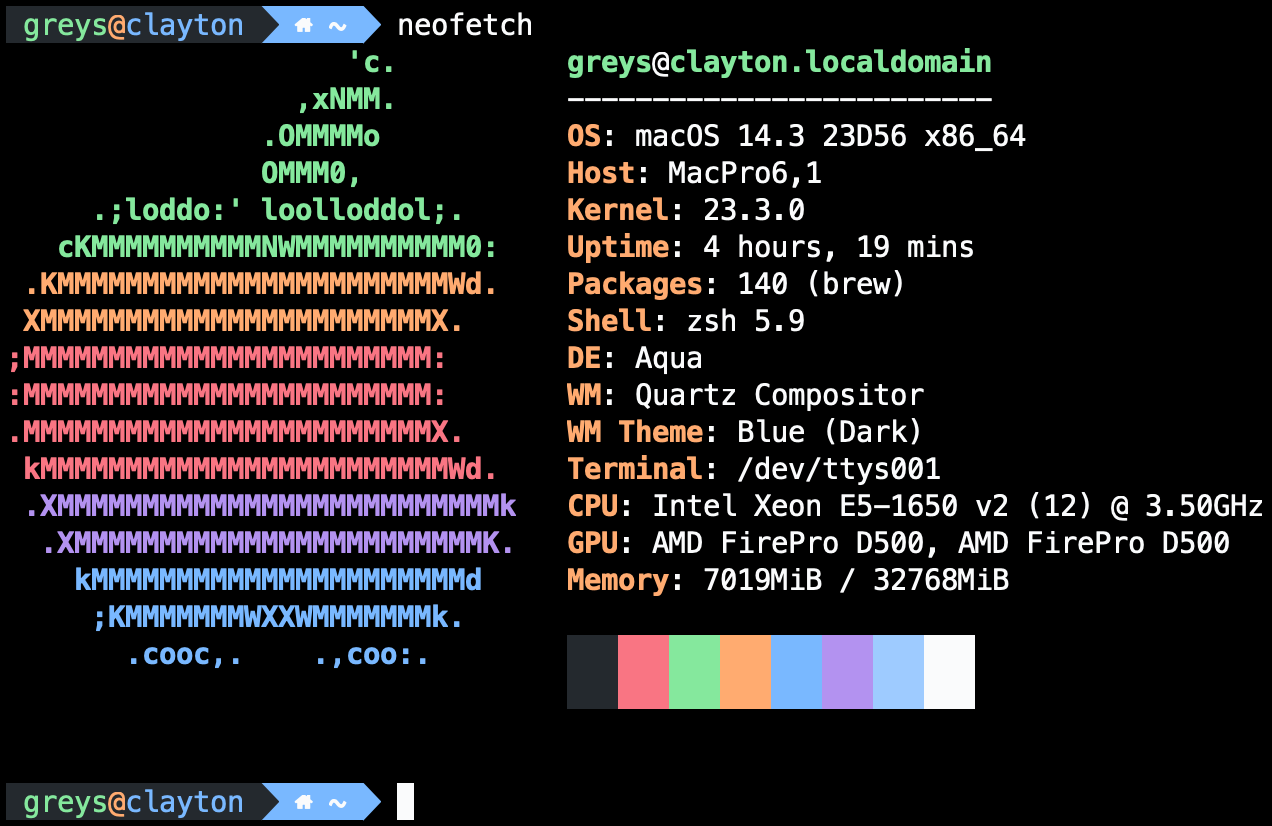
    <content type="html" xml:base="https://www.unixtutorial.org/mac-pro-2013-with-macos-sonoma/"><![CDATA[<p>Did I mention that I have recently purchased the iconic <a href="https://support.apple.com/en-us/112025">Mac Pro 2013</a> desktop for virtualisation and macOS experiments in my <a href="https://www.unixtutorial.org/hardware">homelab</a>?</p>

<p><img src="https://www.unixtutorial.org/images/posts/mac-pro-2013-macos-sonoma.png" alt="Mac Pro 2013 - macOS Sonoma" />
<em>Mac Pro 2013 - macOS Sonoma</em></p>

<p>Yes, the year is 2024 and Mac Pro 2013 is now more than 10 years old, but many models are still in perfect working order and pack quite a punch for something this old.</p>

<h2 id="typical-mac-pro-2013-hardware-specs">Typical Mac Pro 2013 Hardware Specs</h2>
<p>Here are the key hardware specifications for the Mac Pro 2013 model:</p>

<ul>
  <li>CPU: 3.5 GHz 6-Core Intel Xeon E5 (upgradable to 12-core)</li>
  <li>RAM: 32GB 1866 MHz DDR3 ECC (upgradable to 64GB or 128GB)</li>
  <li>Storage: 512GB PCIe-based flash storage</li>
  <li>Graphics: Dual AMD FirePro D500 GPUs with 3GB GDDR5 VRAM each</li>
  <li>Ports:
    <ul>
      <li>6 Thunderbolt 2 ports</li>
      <li>4 USB 3.0 ports</li>
      <li>2 Gigabit Ethernet ports</li>
      <li>1 HDMI 1.4 port</li>
    </ul>
  </li>
  <li>Wireless: 802.11ac Wi-Fi, Bluetooth 4.0</li>
  <li>Dimensions: 9.9 inches tall, 6.6 inches in diameter</li>
  <li>Weight: 11 pounds (5 kg)</li>
</ul>

<p>The model I got comes with 6-core Xeon CPU and 32GB RAM and 512GB SSD. I think it has 6 thunderbolt connections and 4 USB ones, not to mention two Gigabit network interfaces and HDMI. It’s an old system so HDMI only supports 30Mhz for 4K, but thunderbolt connection should support 60Mhz.</p>

<p>If I really want to, I can upgrade it to 64GB RAM or even a much better 12-core CPU - both upgrades seem to be overkill but also sound like quite fun <a href="https://www.unixtutorial.org/projects">projects</a> (and spares for such an old system are really cheap these days).</p>

<p>As always, initial post-config is done using <a href="https://www.unixtutorial.org/software/ansible/">Ansible</a> and <a href="https://www.unixtutorial.org/software/homebrew/">homebrew</a>.</p>

<h2 id="see-also">See Also</h2>
<ul>
  <li><a href="https://support.apple.com/en-us/112025">Mac Pro 2013</a></li>
  <li><a href="https://www.unixtutorial.org/software/homebrew/">Homebrew in macOS</a></li>
  <li><a href="https://www.unixtutorial.org/software/macos">macOS</a></li>
  <li><a href="https://www.unixtutorial.org/software/ansible/">Ansible</a></li>
  <li><a href="https://www.unixtutorial.org/install-software-with-homebrew-in-ansible/">Install Software with Homebrew in Ansible</a>`</li>
  <li><a href="https://www.unixtutorial.org/hardware">Homelab - Hardware</a></li>
</ul><img src="https://feedpress.me/link/15217/16629931.gif" height="1" width="1"/>]]></content>
    <author>
      <name/>
    </author>
    <category term="news,homelab"/>
    <summary type="html"><![CDATA[Did I mention that I have recently purchased the iconic Mac Pro 2013 desktop for virtualisation and macOS experiments in my homelab?]]></summary>
    <media:thumbnail xmlns:media="http://search.yahoo.com/mrss/" url="https://www.unixtutorial.org/images/posts/mac-pro-2013-macos-sonoma.png"/>
    <media:content xmlns:media="http://search.yahoo.com/mrss/" medium="image" url="https://www.unixtutorial.org/images/posts/mac-pro-2013-macos-sonoma.png"/>
  </entry>
  <entry>
    <title type="html">macOS Sonoma 14.0</title>
    <link href="https://feedpress.me/link/15217/16715606/macos-14-sonoma" rel="alternate" type="text/html" title="macOS Sonoma 14.0"/>
    <published>2023-09-30T09:45:00+01:00</published>
    <updated>2023-09-30T09:45:00+01:00</updated>
    <id>https://www.unixtutorial.org/macos-14-sonoma</id>
    <content type="html" xml:base="https://www.unixtutorial.org/macos-14-sonoma/"><![CDATA[<p><img src="https://www.unixtutorial.org/images/software/macos-14-sonoma.png" alt="macOS 14 - Sonoma" />
<em>macOS 14 - Sonoma</em></p>

<p>Apple just released new version of <a href="https://www.unixtutorial.org/software/macos/">macOS</a>, codenamed <a href="https://www.apple.com/macos/sonoma/">Sonoma</a>.</p>

<p>There are the usual security fixes but also lots of really cool usability improvements.</p>

<h1 id="notable-improvements-in-macos-14-sonoma">Notable improvements in macOS 14 Sonoma</h1>
<ul>
  <li>
    <p><strong>login screen redesigned - screensavers integrated</strong> - seems a lot more in line with iPads and iPhones now. But also has aerial screensavers that become the wallpaper once you login. You need to see this to understand exactly what I mean - but basically you’re watching a screensaver (one of the many cool aerial videos), and as soon as you click something the video freezes and the frame becomes your wallpaper once you log in.</p>
  </li>
  <li>
    <p><strong>Safari profiles</strong> - somehow this doesn’t feel like a new idea, but certainly qualifies as a good implementation of one. Profiles allow separate history, extensions, tabs and even cookies - so you could have one for Work, one for Family, etc.</p>
  </li>
  <li>
    <p><strong>Web-apps in the Dock</strong> - it’s quite easy now to open any website and turn it into a web-app - meaning you get a minimally defined Safari window without bookmark or any other tabs and generally looking and behaving just like any other app would. You can put this web app into Dock and even receive notifications.</p>
  </li>
  <li>
    <p><strong>Messages improved</strong> - lots of small improvements, for me the cool one is sharing location via the plus button.</p>
  </li>
  <li>
    <p><strong>Lockdown mode</strong> - this security feature is pretty cool! You can now enable it from any iOS or macOS device (macOS Ventura or later, iOS/iPadOS 16 or later) to minimise certain attack vectors by reducing functionality of web browsing, messaging, photo sharing and connectivity.</p>
  </li>
</ul>

<h2 id="see-also">See Also</h2>
<ul>
  <li><a href="https://www.unixtutorial.org/software/macos/">macOS</a></li>
  <li><a href="https://www.unixtutorial.org/macos-11-big-sur/">macOS 11 - Big Sur</a></li>
  <li><a href="https://www.unixtutorial.org/macos-13-ventura/">macOS 13 - Ventura</a></li>
  <li><a href="https://www.apple.com/macos/sonoma/">Official Sonoma page</a></li>
</ul><img src="https://feedpress.me/link/15217/16715606.gif" height="1" width="1"/>]]></content>
    <author>
      <name/>
    </author>
    <category term="macos"/>
    <summary type="html"><![CDATA[macOS 14 - Sonoma]]></summary>
    <media:thumbnail xmlns:media="http://search.yahoo.com/mrss/" url="https://www.unixtutorial.org/images/software/macos-14-sonoma.png"/>
    <media:content xmlns:media="http://search.yahoo.com/mrss/" medium="image" url="https://www.unixtutorial.org/images/software/macos-14-sonoma.png"/>
  </entry>
  <entry>
    <title type="html">Video: What Browser Do You Use?</title>
    <link href="https://feedpress.me/link/15217/16366469/youtube-what-browser-do-you-use" rel="alternate" type="text/html" title="Video: What Browser Do You Use?"/>
    <published>2023-09-26T09:45:00+01:00</published>
    <updated>2023-09-26T09:45:00+01:00</updated>
    <id>https://www.unixtutorial.org/youtube-what-browser-do-you-use</id>
    <content type="html" xml:base="https://www.unixtutorial.org/youtube-what-browser-do-you-use/"><![CDATA[<p>Another fairly recent video on my YouTube channel: <a href="https://yotu.be/jr1fkGy0RKo">What Browser Do You Use?</a>. Please subscribe to my channel if you haven’t done so yet!</p>

<iframe width="560" height="315" src="https://www.youtube.com/embed/jr1fkGy0RKo?si=4d4_kJ6mILjyxE-B" title="YouTube video player" frameborder="0" allow="accelerometer; autoplay; clipboard-write; encrypted-media; gyroscope; picture-in-picture; web-share" allowfullscreen=""></iframe>

<p>The <a href="https://www.unixtutorial.org/videos">Unix Tutorial Videos</a> section on this website has been updated, and you can always find videos using <a href="https://www.unixtutorial.tv">www.UnixTutorial.TV</a> address.</p>

<p>Hope this helps you, thanks for checking my videos out!</p>

<h2 id="see-also">See Also</h2>
<ul>
  <li><a href="https://www.unixtutorial.tv">UnixTutorial.TV</a></li>
  <li><a href="https://www.unixtutorial.org/videos">Unix Tutorial Videos</a></li>
</ul><img src="https://feedpress.me/link/15217/16366469.gif" height="1" width="1"/>]]></content>
    <author>
      <name/>
    </author>
    <category term="news,youtube"/>
    <summary type="html"><![CDATA[Another fairly recent video on my YouTube channel: What Browser Do You Use?. Please subscribe to my channel if you haven’t done so yet!]]></summary>
    <media:thumbnail xmlns:media="http://search.yahoo.com/mrss/" url="https://www.unixtutorial.org/images/youtube/youtube-what-browser.png"/>
    <media:content xmlns:media="http://search.yahoo.com/mrss/" medium="image" url="https://www.unixtutorial.org/images/youtube/youtube-what-browser.png"/>
  </entry>
  <entry>
    <title type="html">Video: Welcome to Unix Tutorial YouTube channel</title>
    <link href="https://feedpress.me/link/15217/16351625/welcome-to-unixtutorial-youtube-channel" rel="alternate" type="text/html" title="Video: Welcome to Unix Tutorial YouTube channel"/>
    <published>2023-09-15T09:45:00+01:00</published>
    <updated>2023-09-15T09:45:00+01:00</updated>
    <id>https://www.unixtutorial.org/welcome-to-unixtutorial-youtube-channel</id>
    <content type="html" xml:base="https://www.unixtutorial.org/welcome-to-unixtutorial-youtube-channel/"><![CDATA[<p>I made a welcome video on my YouTube channel: <a href="https://youtu.be/pOMWh8K2c_4">Welcome to Unix Tutorial</a>. Please subscribe to my channel if you haven’t done so yet!</p>

<iframe width="560" height="315" src="https://www.youtube.com/embed/pOMWh8K2c_4?si=8EO0zEiFo_ConM7n" frameborder="0" allow="accelerometer; autoplay; clipboard-write; encrypted-media; gyroscope; picture-in-picture" allowfullscreen=""></iframe>

<p>The <a href="https://www.unixtutorial.org/videos">Unix Tutorial Videos</a> section on this website has been updated, and you can always find videos using <a href="https://www.unixtutorial.tv">www.UnixTutorial.TV</a> address.</p>

<p>Hope this helps you, thanks for checking my videos out!</p>

<h2 id="see-also">See Also</h2>
<ul>
  <li><a href="https://www.unixtutorial.tv">UnixTutorial.TV</a></li>
  <li><a href="https://www.unixtutorial.org/videos">Unix Tutorial Videos</a></li>
</ul><img src="https://feedpress.me/link/15217/16351625.gif" height="1" width="1"/>]]></content>
    <author>
      <name/>
    </author>
    <category term="news,youtube"/>
    <summary type="html"><![CDATA[I made a welcome video on my YouTube channel: Welcome to Unix Tutorial. Please subscribe to my channel if you haven’t done so yet!]]></summary>
    <media:thumbnail xmlns:media="http://search.yahoo.com/mrss/" url="https://www.unixtutorial.org/images/youtube/youtube-welcome.png"/>
    <media:content xmlns:media="http://search.yahoo.com/mrss/" medium="image" url="https://www.unixtutorial.org/images/youtube/youtube-welcome.png"/>
  </entry>
  <entry>
    <title type="html">Homelab: MacBook Pro M2</title>
    <link href="https://feedpress.me/link/15217/15946409/macbook-pro-14-m2" rel="alternate" type="text/html" title="Homelab: MacBook Pro M2"/>
    <published>2023-01-31T08:45:00+00:00</published>
    <updated>2023-01-31T08:45:00+00:00</updated>
    <id>https://www.unixtutorial.org/macbook-pro-14-m2</id>
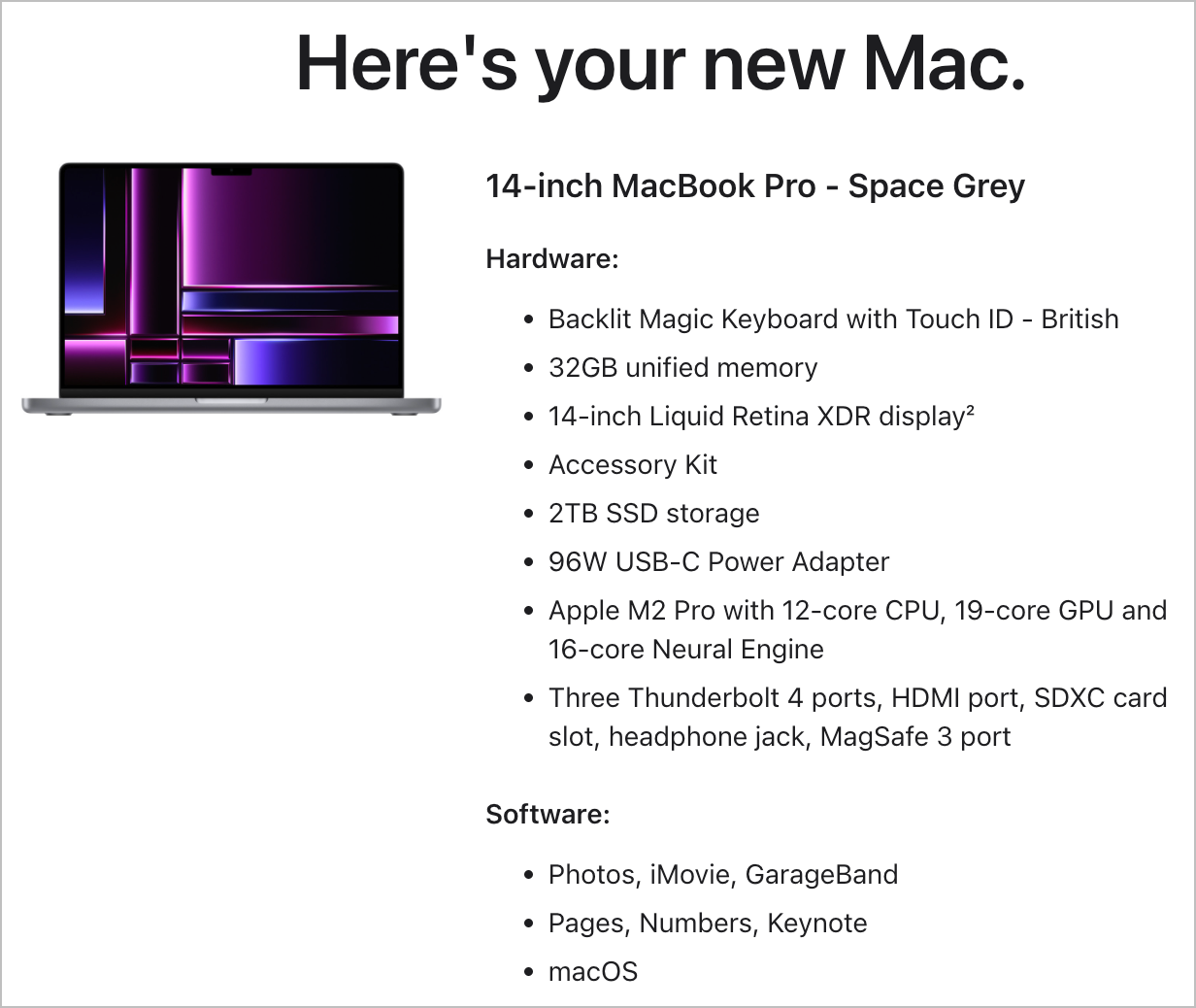
    <content type="html" xml:base="https://www.unixtutorial.org/macbook-pro-14-m2/"><![CDATA[<p>The day has come! After 5 years of using MacBook Pro 15” with retina screen and i7 processor, I have finally upgraded my laptop to the M2 based MacBook Pro 14”:
<img src="https://www.unixtutorial.org/images/posts/macbook-pro-14-m2.png" alt="MacBook Pro 14&quot; - M2" />
<em>MacBook Pro 14” - M2</em></p>

<p>I didn’t go for the M2 Max setup or 64GB RAM as I do not expect to calculate Universe expansion or render multiple 8K video streams simultaneously on this laptop. Honestly, it’s such a massive step from my 5-year-old Intel macbook that I would still be impressed even with the base M2 model.</p>

<p>It’s a very exciting time to be post-configuring this super powerful laptop using <a href="https://www.unixtutorial.org/software/ansible/">Ansible</a>. 
I’m using <a href="https://www.jeffgeerling.com/">Jeff Geerling</a>’s <a href="https://galaxy.ansible.com/geerlingguy/mac">geerlingguy-mac collection</a> for this, integrated into my own <a href="https://www.unixtutorial.org/software/ansible/">Ansible</a> server as part of the <a href="https://www.unixtutorial.org/hardware">homelab</a>.</p>

<p>If you haven’t used <a href="https://www.unixtutorial.org/software/ansible/">Ansible</a> to configure macOS systems - check it out! I’ve only done the <a href="https://www.unixtutorial.org/software/homebrew/">Homebrew</a> part so far, but it’s possible to automate MAS (macOS Apple Store) deployments as well.</p>

<p>Will keep you posted!</p>

<h2 id="see-also">See Also</h2>
<ul>
  <li><a href="https://www.unixtutorial.org/software/homebrew/">Homebrew in macOS</a></li>
  <li><a href="https://www.unixtutorial.org/software/ansible/">Ansible</a></li>
  <li><a href="https://www.jeffgeerling.com/">Jeff Geerling</a></li>
  <li><a href="https://galaxy.ansible.com/geerlingguy/mac">geerlingguy-mac collection on Ansible Galaxy</a></li>
  <li><a href="https://www.unixtutorial.org/install-software-with-homebrew-in-ansible/">Install Software with Homebrew in Ansible</a>`</li>
  <li><a href="https://www.unixtutorial.org/hardware">Homelab - Hardware</a></li>
</ul><img src="https://feedpress.me/link/15217/15946409.gif" height="1" width="1"/>]]></content>
    <author>
      <name/>
    </author>
    <category term="news,homelab"/>
    <summary type="html"><![CDATA[The day has come! After 5 years of using MacBook Pro 15” with retina screen and i7 processor, I have finally upgraded my laptop to the M2 based MacBook Pro 14”: MacBook Pro 14” - M2]]></summary>
    <media:thumbnail xmlns:media="http://search.yahoo.com/mrss/" url="https://www.unixtutorial.org/images/posts/macbook-pro-14-m2.png"/>
    <media:content xmlns:media="http://search.yahoo.com/mrss/" medium="image" url="https://www.unixtutorial.org/images/posts/macbook-pro-14-m2.png"/>
  </entry>
  <entry>
    <title type="html">Video: awk delimiters</title>
    <link href="https://feedpress.me/link/15217/15788056/awk-delimiters-video" rel="alternate" type="text/html" title="Video: awk delimiters"/>
    <published>2022-11-17T08:45:00+00:00</published>
    <updated>2022-11-17T08:45:00+00:00</updated>
    <id>https://www.unixtutorial.org/awk-delimiters-video</id>
    <content type="html" xml:base="https://www.unixtutorial.org/awk-delimiters-video/"><![CDATA[<p>I have published a new video on YouTube: <a href="https://youtu.be/NTlQdkVdYSk">Introduction to AWK Delimiters</a>. Please subscribe to my channel if you haven’t done so yet!</p>

<iframe width="560" height="315" src="https://www.youtube.com/embed/NTlQdkVdYSk" frameborder="0" allow="accelerometer; autoplay; clipboard-write; encrypted-media; gyroscope; picture-in-picture" allowfullscreen=""></iframe>

<p>The <a href="https://www.unixtutorial.org/videos">Unix Tutorial Videos</a> section on this website has been updated, and you can always find videos using <a href="https://www.unixtutorial.tv">www.UnixTutorial.TV</a> address.</p>

<p>Hope this helps you, thanks for checking my videos out!</p>

<h2 id="see-also">See Also</h2>
<ul>
  <li><a href="https://www.unixtutorial.tv">UnixTutorial.TV</a></li>
  <li><a href="https://www.unixtutorial.org/videos">Unix Tutorial Videos</a></li>
</ul><img src="https://feedpress.me/link/15217/15788056.gif" height="1" width="1"/>]]></content>
    <author>
      <name/>
    </author>
    <category term="news,youtube"/>
    <summary type="html"><![CDATA[I have published a new video on YouTube: Introduction to AWK Delimiters. Please subscribe to my channel if you haven’t done so yet!]]></summary>
    <media:thumbnail xmlns:media="http://search.yahoo.com/mrss/" url="https://www.unixtutorial.org/images/youtube/youtube-awk-delimiters.png"/>
    <media:content xmlns:media="http://search.yahoo.com/mrss/" medium="image" url="https://www.unixtutorial.org/images/youtube/youtube-awk-delimiters.png"/>
  </entry>
  <entry>
    <title type="html">macOS Ventura 13.0</title>
    <link href="https://feedpress.me/link/15217/15739178/macos-13-ventura" rel="alternate" type="text/html" title="macOS Ventura 13.0"/>
    <published>2022-10-25T09:45:00+01:00</published>
    <updated>2022-10-25T09:45:00+01:00</updated>
    <id>https://www.unixtutorial.org/macos-13-ventura</id>
    <content type="html" xml:base="https://www.unixtutorial.org/macos-13-ventura/"><![CDATA[<p><img src="https://www.unixtutorial.org/images/software/macos-13-ventura.png" alt="macOS 13 - Ventura" />
<em>macOS 13 - Ventura</em></p>

<p>Excellent! Apple just released new version of <a href="https://www.unixtutorial.org/software/macos/">macOS</a>, codenamed <a href="https://www.apple.com/ie/macos/ventura/">Ventura</a>. 
As always, most of the features are visual and usability improvements, so from Unix point of view
I do not expect anything more dramatic than uplift of shells and built-in software.</p>

<p>This said, there’s been quite a few security fixes (more than a hundred, I think) made in this release: <a href="https://support.apple.com/en-us/HT213488">HT213488 - macOS Ventura</a> - so that’s great news.</p>

<h1 id="notable-improvements-in-macos-13-ventura">Notable improvements in macOS 13 Ventura</h1>
<ul>
  <li><strong>richer search results</strong> - Spotlight (and I’m hoping launchers like Alfred) will have access to provide richer results via Quick Look functionality</li>
  <li><strong>Spotlight quick actions</strong> - starting a timer, checking time, enabling/disabling focus mode - sounds cool!</li>
  <li><strong>Passkeys</strong> - sounds like a big step towards improved security. Need to research it more to see how truly useful this new sign-in method is going to be</li>
  <li><strong>Messages improvements</strong> - mark a message unread or edit the message you just sent</li>
  <li><strong>iCloud Shared Photos</strong> - sounds like a great way to collaborate on photos within a family or a team</li>
  <li><strong>Stage Manager</strong> - I never quite learned to use multiple virtual desktops, so maybe this new take at grouping and managing windows will help?</li>
  <li><strong>iPhone as a webcam</strong> - I’m really curious at how well this will work. Seems we’ll get a massive resolution/quality improvement over the built-in camera on most Macbooks? <strong>Desk View</strong> sounds like another awesome thing to try!</li>
  <li><strong>Centre Stage</strong> - I’ve used this on iPad and it’s pretty cool - the camera follows you to make sure you stay centered in the webcam frame.</li>
  <li><strong>Share Play</strong> - last couple of years are seeing a lot of focus on shared activities - I think it’s awesome how these are shaping up.</li>
</ul>

<h2 id="see-also">See Also</h2>
<ul>
  <li><a href="https://www.unixtutorial.org/software/macos/">macOS</a></li>
  <li><a href="https://www.unixtutorial.org/macos-11-big-sur/">macOS 11 - Big Sur</a></li>
  <li><a href="https://www.apple.com/ie/macos/ventura/">Official Ventura page</a></li>
</ul><img src="https://feedpress.me/link/15217/15739178.gif" height="1" width="1"/>]]></content>
    <author>
      <name/>
    </author>
    <category term="macos"/>
    <summary type="html"><![CDATA[macOS 13 - Ventura]]></summary>
    <media:thumbnail xmlns:media="http://search.yahoo.com/mrss/" url="https://www.unixtutorial.org/images/software/macos-13-ventura.png"/>
    <media:content xmlns:media="http://search.yahoo.com/mrss/" medium="image" url="https://www.unixtutorial.org/images/software/macos-13-ventura.png"/>
  </entry>
  <entry>
    <title type="html">Video: How To Generate ed25519 key</title>
    <link href="https://feedpress.me/link/15217/15730769/generating-ed25519-ssh-key-video" rel="alternate" type="text/html" title="Video: How To Generate ed25519 key"/>
    <published>2022-10-21T09:45:00+01:00</published>
    <updated>2022-10-21T09:45:00+01:00</updated>
    <id>https://www.unixtutorial.org/generating-ed25519-ssh-key-video</id>
    <content type="html" xml:base="https://www.unixtutorial.org/generating-ed25519-ssh-key-video/"><![CDATA[<p>I have published a new video on YouTube the other week: <a href="https://youtu.be/3PHfKFhvldc">How To: Generate Ed25519 SSH key pair</a> about <a href="https://www.unixtutorial.org/glossary/ed25519">Ed25519</a> SSH keys.</p>

<iframe width="560" height="315" src="https://www.youtube.com/embed/3PHfKFhvldc" frameborder="0" allow="accelerometer; autoplay; clipboard-write; encrypted-media; gyroscope; picture-in-picture" allowfullscreen=""></iframe>

<p>The <a href="https://www.unixtutorial.org/videos">Unix Tutorial Videos</a> section on this website has been updated, and you can always find videos using <a href="https://www.unixtutorial.tv">www.UnixTutorial.TV</a> address.</p>

<p>Hope this helps you, thanks for checking my videos out!</p>

<h2 id="see-also">See Also</h2>
<ul>
  <li><a href="https://www.unixtutorial.tv">UnixTutorial.TV</a></li>
  <li><a href="https://www.unixtutorial.org/videos">Unix Tutorial Videos</a></li>
  <li><a href="https://www.unixtutorial.org/glossary/ed25519">ed25519</a></li>
</ul><img src="https://feedpress.me/link/15217/15730769.gif" height="1" width="1"/>]]></content>
    <author>
      <name/>
    </author>
    <category term="news,youtube"/>
    <summary type="html"><![CDATA[I have published a new video on YouTube the other week: How To: Generate Ed25519 SSH key pair about Ed25519 SSH keys.]]></summary>
    <media:thumbnail xmlns:media="http://search.yahoo.com/mrss/" url="https://www.unixtutorial.org/images/youtube/youtube-generate-ed25519-ssh.png"/>
    <media:content xmlns:media="http://search.yahoo.com/mrss/" medium="image" url="https://www.unixtutorial.org/images/youtube/youtube-generate-ed25519-ssh.png"/>
  </entry>
</feed>